Type Sprint: Typing Games
Masterskaya DKTrivia
4.52.02K Reviews
- Version
- 1.14.2
- Installs
- 10.00M
- Age Rating
- Everyone
Screenshots
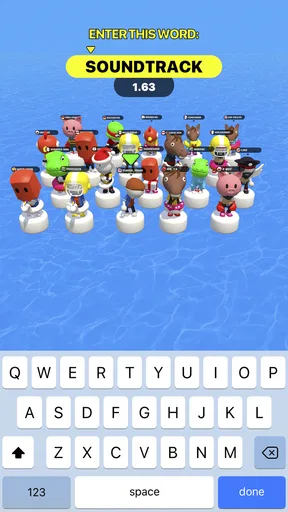
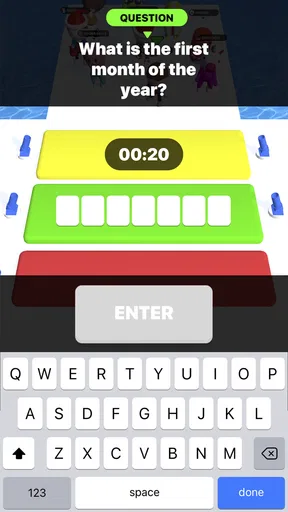
Play Leadline


Our Review of Type Sprint: Typing Games
 Analysis by Appyee
I like the basic idea behind Type Sprint: Typing Games: it turns the familiar phone keyboard into the center of a quick, competitive challenge. It is a free trivia game from Masterskaya DK, though its appeal is less about answering general-knowledge questions and more about how quickly and accurately you can type. That makes it a different kind of pick-me-up from a standard quiz app. I’d recommend it to people who enjoy short skill-based rounds, as long as they are comfortable with the fact that phone typing is not the same as practicing on a computer keyboard.
The game is a particularly easy fit for little breaks: a few minutes while waiting for a coffee, sitting on a bus, or taking a pause between tasks. The races give those spare moments a clear goal, and the typing itself keeps your hands involved rather than asking you to scroll through question cards. I would not treat it as a serious typing course, but it can make repeated practice feel less like drilling and more like play.
Why the race format works
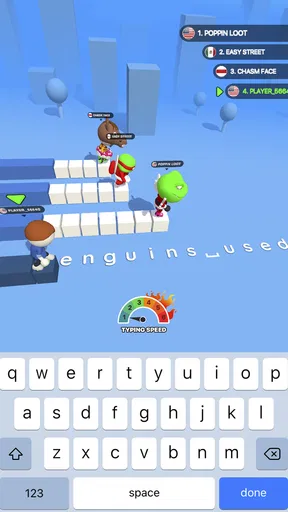
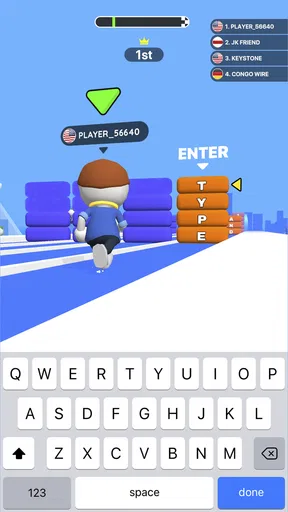
The strongest part of the concept is the way a familiar task becomes a small contest. Rather than opening a conventional typing tutor and repeating a lesson, I can focus on keeping up with the text and finishing a run. Speed matters, but rushing into mistakes can undo the advantage, so the central tension is easy to understand even if someone has never used a typing game before.
That balance also makes it approachable for different moods. When I want a quick burst of pressure, I can concentrate on moving faster; when I want to be more careful, I can treat clean keystrokes as the goal. The running-race presentation gives those choices a visual payoff. It is a simple hook, but a useful one: a typing challenge feels more lively when progress is represented as a race rather than just a number on a test screen.
There is a practical caveat to that appeal. A phone’s on-screen keyboard rewards different habits from a physical keyboard, and autocorrect, keyboard layout, and thumb reach can all affect how comfortable a round feels. I would use the game to sharpen attention and get more deliberate about tapping, not as proof that I will type faster on a laptop. If your main goal is workplace typing fluency, a dedicated desktop tutor is the better tool; if your goal is an entertaining mobile challenge, the format makes much more sense.
Who will enjoy a few quick rounds
I can picture this being most enjoyable for players who like bite-sized competitions and want something more active than a typical trivia quiz. It can also suit someone who already spends a lot of time messaging and is curious whether they can type with fewer pauses. A realistic routine would be opening a round during a short wait, focusing on accuracy rather than chasing a personal best every time, then putting the phone away without needing to set aside a full practice session.
One small habit makes that kind of play more useful: use the same keyboard setup from one session to the next where possible. Switching layouts or relying on different autocorrect behavior can make your results feel inconsistent, even when your underlying tapping is improving. I would also resist treating a single strong run as a meaningful skill leap. Short rounds are better for building a repeatable rhythm than measuring lasting progress, so it helps to notice whether you are making fewer avoidable errors across several play sessions.
Players looking for a deep story, a relaxing game with no time pressure, or a broad bank of trivia questions may find the premise too narrow. The appeal depends on enjoying the act of typing under a little pressure. Likewise, if typing on a touchscreen is uncomfortable or difficult, the race format may make that frustration more obvious rather than solve it. In those cases, a slower word puzzle or a conventional quiz is likely a better fit.
What’s the Buzz About?
So, what’s the deal with Type Sprint: Typing Games? At its core, it’s a typing game that challenges your speed and accuracy. The app has a variety of game modes, each with its own unique set of challenges. From timed races to accuracy tests, you’ll never find yourself bored. Trust me, even if you think you're a typing pro, this app will put your skills to the test.
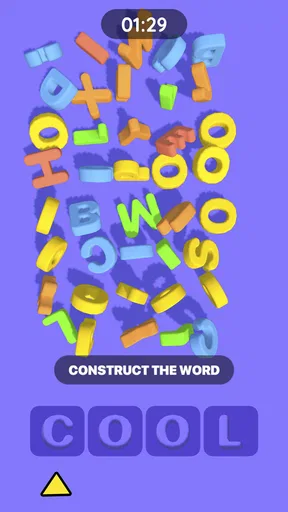
The interface is pretty slick, too. It's got this colorful vibe that makes the whole experience feel more like a game and less like a typing test. The developers have really nailed the balance between challenging gameplay and a fun, engaging design.
That game-first approach is also what separates it from ordinary typing drills. A practice tool usually asks you to repeat exercises for improvement, while a broad trivia game tests what you know. Here, the keyboard is the challenge itself, and the race framing gives each attempt an immediate purpose. I would pick it over a plain typing test when I want motivation to start; I would pick the test when I need a more systematic way to assess technique.
Game Modes Galore
One of the coolest things about this app is the variety of game modes. You’ve got your classic timed challenges where you race against the clock to type as fast as you can. If you're someone who thrives under pressure, this is your jam.
But if you’re more into precision, there’s a mode for that too. Here, the focus is on accuracy, and let me tell you, it's no walk in the park. You’ll find yourself sweating over every keystroke, but that’s part of the fun, right?
"It's not just about speed; it’s about nailing each letter perfectly."
For a more useful practice loop, I would alternate between the pressure of a timed run and the slower attention an accuracy challenge demands. The first can reveal where I hesitate; the second encourages me not to cover those hesitations by simply tapping faster. If I am playing while distracted, I would choose a less competitive moment instead of blaming the game for a poor result. Typing races reward concentration, and even a brief interruption can break the rhythm.
Level Up Your Skills
What I love most about Type Sprint is how it tracks your progress. You can actually see yourself getting better over time, and that’s pretty motivating. The app keeps tabs on your stats and even gives you little badges when you hit certain milestones. It's like having a personal coach cheering you on!
Also, the app has this super handy feature where it identifies your most common mistakes. This way, you can focus on improving specific areas, making your practice sessions way more efficient.
The most valuable way to use that feedback is to treat it as a prompt for the next round, not as a verdict on your ability. If the game points to a repeated mistake, slow down enough to notice the pattern and then try again with that one point in mind. That is a more realistic use of the feature than chasing every badge or expecting an instant change in typing speed. A short session with one clear focus can feel more satisfying than a long run of attempts where I only watch the score.
There is also a limit to what any mobile typing score can tell you. It reflects performance in this game on your device, not every kind of writing you might do elsewhere. A score can be affected by the keyboard you use and how familiar you are with its layout. I would use the progress tools to keep practice engaging and spot recurring slips, while judging real-world improvement by whether everyday messages feel smoother and require fewer corrections.
Availability and expectations
Type Sprint has an average rating of 4.4 from around 116,000 ratings, and it has been installed over 10 million times. That level of reach suggests the quick typing-race idea has found a sizeable audience, though popularity alone does not mean every player will enjoy the time pressure. It is rated for Everyone, costs nothing to download, and was released on June 15, 2021. The current version is 1.13.1, and it requires Android 7.1 or later.
Those details make it an accessible option for many Android users, but I would still think about the kind of game I actually want before installing. It is not a substitute for a full keyboard-training course, and its appeal is not the same as a question-and-answer trivia collection. It sits in a narrower, more playful space: a mobile typing challenge that works best when I have a few spare minutes and feel like testing my focus.
Wrapping It Up
To sum it up, Type Sprint: Typing Games is more than just a game; it's a tool for self-improvement. Whether you're looking to boost your typing speed for work or just want a fun way to challenge yourself, this app is a solid choice. The engaging gameplay, coupled with the skill-tracking features, makes it a must-try for anyone looking to up their typing game.
I would soften the work-speed promise: it can make practice more enjoyable, but playing on a touchscreen does not automatically translate into faster typing at a desk. The better reason to try it is that it gives a simple, repeatable challenge and feedback that can make you more attentive to accuracy. For casual players who like races and do not mind typing under pressure, that is a worthwhile combination. For anyone who wants careful instruction, broad trivia, or a more relaxed pace, another kind of app will serve them better.
So, next time you have a few minutes to spare, why not give it a whirl? You might just find yourself addicted to improving your typing skills one keystroke at a time.
Privacy and Permissions
See what permissions an app requests and how it handles your data.
- Photos/Media/Files
- read the contents of your USB storage
- Storage
- read the contents of your USB storage
- Wi-Fi connection information
- view Wi-Fi connections
- Other
- view network connections, full network access, control vibration, prevent device from sleeping, Google Play license check
Verdict
Strengths of Type Sprint: Typing Games
- Enhances typing speed effectively.
- Engaging and fun gameplay mechanics.
- Variety of levels and challenges.
- User-friendly interface and design.
- Regular updates with new content.
Limitations of Type Sprint: Typing Games
- Limited customization options.
- In-app ads can be intrusive.
- Requires internet connection.
- No multiplayer feature available.
- Some levels feel repetitive.
Similar Picks in This Category
View All
Millionaire 2026 Quiz & Trivia
Quiz & Trivia Games by Submarine Apps4.5

Brain Test 2: Tricky Stories
Unico Studio4.7

Trivia Crack: Brain Quiz Games
etermax4.4

QuizzLand. Quiz & Trivia game
Quiz & Trivia Games by Mno Go Apps4.8

Brain Test: Tricky Puzzles
Unico Studio4.7

Logo Quiz
bubble quiz games4.5
Frequently Asked Questions
What is Type Sprint: Typing Games?
Type Sprint: Typing Games is an interactive app designed to improve your typing speed and accuracy through a series of fun and engaging games. It offers various levels and challenges that adapt to your skill level, making it suitable for both beginners and advanced typists looking to enhance their skills.
Is Type Sprint suitable for all age groups?
Yes, Type Sprint is designed for a wide range of age groups. While it primarily focuses on improving typing skills, the games are entertaining and engaging for both children and adults. The app’s user-friendly interface and adjustable difficulty levels make it accessible for everyone.
Does Type Sprint require an internet connection?
Type Sprint can be played offline, which means you don’t need a constant internet connection to enjoy the games. However, certain features, like leaderboard updates and online competitions, may require internet access to function properly.
What devices are compatible with Type Sprint: Typing Games?
Type Sprint is compatible with both Android and iOS devices. It runs smoothly on most smartphones and tablets, ensuring that users can enjoy the typing games on a variety of screen sizes. Make sure your device meets the minimum system requirements for optimal performance.
Are there in-app purchases in Type Sprint?
Yes, Type Sprint offers in-app purchases. While the app is free to download and play, certain features or levels may require a purchase to unlock. These purchases can enhance your experience by providing access to premium content or additional customization options.
Play our best games!


